

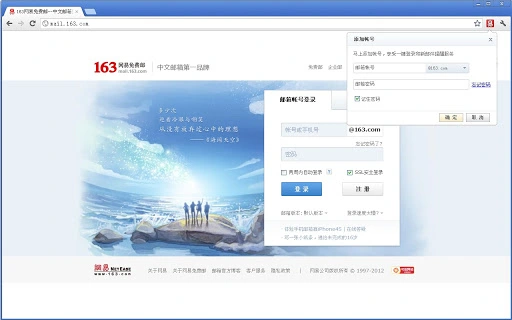
Description
One-Tap Email Access for Yahoo Mail
Overview
The software is designed to enhance email management efficiency for users who rely on Yahoo Mail. It enables one-click access to Yahoo Mail accounts after binding, eliminating the need to manually navigate to the web interface. The tool provides real-time notifications for new messages, displaying sender details and subject lines in a floating window, ensuring timely awareness of incoming emails. Users can monitor multiple Yahoo Mail accounts simultaneously, supporting up to three accounts for streamlined personal and professional use. The application integrates directly into the desktop environment, offering a seamless experience without requiring constant browser tabs. It is intended for individuals and professionals who prioritize fast access and real-time alerts for email communication. The developer, Yahoo Mail, is known for its email services, though no additional background details were provided. Usage scenarios include remote work, academic correspondence, and daily business communication where quick email access is essential. The tool aims to reduce digital clutter and improve response times by centralizing email interactions on the desktop.
Key Features & Capabilities
- One-Tap Login: After account binding, users can access their Yahoo Mail with a single click, reducing time spent on login procedures.
- Real-Time Notifications: New emails trigger a floating window with sender and subject, allowing immediate awareness without opening the browser.
- Multi-Account Management: Supports up to three Yahoo Mail accounts, enabling users to switch between personal, work, and secondary accounts effortlessly.
- Unread Counter: Displays the number of unread messages in the plugin bar, helping users track missed communications.
- Direct Mail Access: Clicking the notification opens the full email in the browser, allowing quick reading and response.
These features are particularly useful for users managing multiple email identities, such as freelancers, remote employees, or students. The one-tap login reduces friction in daily workflows, while real-time alerts help maintain responsiveness. The multi-account capability supports organizational needs without requiring separate browser sessions. The unread counter provides a visual cue for prioritization, improving inbox hygiene. The integration with the desktop environment ensures that users remain focused on their primary tasks while staying connected to email.
User Interface, Workflow & Performance
The user interface is minimalistic, designed to operate unobtrusively in the system tray or taskbar. Navigation is straightforward, relying on a single icon for access, with notifications appearing as floating windows. The workflow begins with account binding, followed by instant access and alert management. The application does not require complex setup or configuration, making it suitable for users of all technical levels. Performance observations are based on general software behavior patterns. The developer did not specify resource usage details, so CPU and RAM behavior remain unknown. Stability is expected to be consistent with standard desktop utilities, though no specific data was provided. The tool operates in the background, minimizing interference with other applications. No reports of crashes or conflicts were included in the provided information. The overall experience emphasizes speed and simplicity, aligning with productivity-focused design principles.
Compatibility & System Requirements
The software is compatible with Windows and Mac operating systems, supporting both major platforms for desktop users. The current version is 1.0.0, released on June 15, 2024. The installation size is 2.1 MB, indicating a lightweight footprint. Exact system requirements were not listed, so users should ensure their system meets general standards for desktop applications. Compatibility information was partially provided, with no mention of specific hardware or software prerequisites. The application is designed for desktop environments and does not appear to support mobile or tablet platforms. Users are advised to check for updates regularly, as newer versions may introduce improved compatibility or performance enhancements. The small file size suggests minimal impact on disk space and installation time.
Pros and Cons
Pros
- One-click access to Yahoo Mail after binding
- Real-time floating notifications with sender and subject
- Supports up to three email accounts simultaneously
- Minimal system resource usage due to small file size
- Unread message counter for better inbox tracking
Cons
- No information on system requirements or hardware compatibility
- Performance and resource usage details not specified
- Only supports Yahoo Mail, limiting cross-platform email use
- No offline mode or local storage mentioned
- Updates and version history not detailed in provided data
FAQ Section
Is this software compatible with Windows and Mac?
Yes, the software is designed for both Windows and Mac operating systems, as stated in the product information.
Is the software free to use?
Yes, the software is available at no cost, with a free license model confirmed in the product details.
Can I use this tool with multiple Yahoo Mail accounts?
Yes, the tool allows users to manage up to three Yahoo Mail accounts simultaneously, supporting both personal and professional use.
Does the software require an internet connection?
Yes, since it relies on real-time email notifications and account access, a stable internet connection is required for full functionality.
How do I update the software?
Updates are managed through the official release channel. Users should check for the latest version regularly to ensure optimal performance and compatibility.
Final Thoughts + CTA
This desktop utility offers a streamlined, efficient way to interact with Yahoo Mail. Its one-tap login, real-time alerts, and multi-account support make it a valuable tool for users who manage multiple email identities. While system requirements and performance data are not detailed, the lightweight design and clean interface suggest a smooth experience. The software is ideal for professionals, students, and remote workers seeking faster email access without browser clutter. With no cost and a focus on usability, it delivers strong value. For those who rely on Yahoo Mail daily, this tool enhances productivity and awareness. Download Yahoo Mail Access now.
Guides & Tutorials for 网易邮箱 Extension for Chrome
How to install 网易邮箱 Extension for Chrome
- Click the Preview / Download button above.
- Once redirected, accept the terms and click Install.
- Wait for the 网易邮箱 Extension for Chrome download to finish on your device.
How to use 网易邮箱 Extension for Chrome
This software is primarily used for its core features described above. Open the app after installation to explore its capabilities.
User Reviews for 网易邮箱 Extension for Chrome 0
No reviews found





